Industrial devices generate a large amount of data every day. PLCs, sensors, meters, drives, and controllers all collect information that can be useful for monitoring, control, maintenance, and analysis.
For decades, Modbus has been one of the most common protocols for communication between industrial devices. But as factories become more connected, the data often needs to move beyond the local network—to IoT platforms, monitoring software, or cloud applications.
This is where MQTT comes into the picture.
So, what is the difference between Modbus and MQTT? Can MQTT replace Modbus? And if an existing device only supports Modbus, how can its data be sent to an MQTT-based system?
Let’s look at the differences and how the two protocols can work together.
Modbus: Communication Between Industrial Devices
Modbus was developed in 1979 and remains widely used in industrial automation. Its simple structure and broad device compatibility make it a practical choice for connecting PLCs, meters, sensors, drives, and controllers.
Modbus is available in several forms, with Modbus RTU, Modbus ASCII, and Modbus TCP being the most common.
Modbus RTU and ASCII normally run over serial interfaces such as RS-232 and RS-485. Modbus TCP runs over Ethernet and TCP/IP networks.
The basic communication process is straightforward: a Modbus client or master sends a request, and the server or slave processes the request and sends back a response.
For example, a master may ask a temperature sensor to provide the value stored in a particular register. The sensor returns the requested data.
This request-response model works well for local industrial communication. However, Modbus data is closely tied to the device’s register map. The receiving application needs to know which register contains the required value and how that value should be interpreted.
That can become less convenient when the same data needs to be shared with modern IT or cloud systems.
MQTT: Communication for Connected Systems
MQTT takes a different approach.
MQTT is a lightweight messaging protocol designed for communication between devices and applications. Instead of continuously asking a device for data, systems can publish data to an MQTT broker, while other applications subscribe to the information they need.
A simple MQTT architecture looks like this:
Sensor → MQTT Broker → Monitoring Application
For example, a temperature sensor could publish data under the topic:
factory/line1/sensor01/temperature
A monitoring application subscribes to this topic and receives the published values.
One advantage is that the sensor does not need to know which application will use the data. Multiple applications can subscribe to the same topic without requiring the sensor to establish a separate connection with each one.
This makes MQTT particularly useful for IoT systems, remote monitoring, and applications where data needs to be distributed to multiple systems.
Modbus vs MQTT: What Is the Difference?
The two protocols are not really direct competitors. They were designed for different communication tasks.
Communication Model
Modbus uses a request-response model.
The client asks for data, and the device responds:
Modbus: “Give me the data.”
MQTT uses a publish-subscribe model:
MQTT: “Here is the data. Anyone who needs it can receive it.”
This difference becomes important when a system has many applications that need access to the same data.
Data Format
Modbus data is typically represented through registers. Consider a simplified Modbus RTU response:
01 03 02 00 FA B8 3D
If the value 250 represents temperature and the device uses a scaling factor of 0.1, the application needs to know this rule before it can interpret the value:
250 ÷ 10 = 25.0°C
Without the device’s register map and scaling information, the raw value does not tell us much.
MQTT can make the data easier to understand by using meaningful topics and payloads:
Topic:
factory/line1/sensor01/temperature
Payload:
25.0
The topic provides context, while the payload contains the value.
Latency and Reliability
Modbus over RS-485 is useful when predictable local communication is important. There is no broker or Internet connection in the communication path, which makes the timing relatively straightforward.
MQTT introduces a broker and normally operates over TCP/IP. This can add some communication overhead and latency.
That does not make MQTT unsuitable for industrial applications. It is commonly used for monitoring, alarms, data collection, and remote communication. However, applications requiring tightly controlled millisecond-level response times generally keep the control loop local rather than depending on MQTT across a wide-area network.
MQTT also provides Quality of Service (QoS) levels and session mechanisms that can help deal with temporary network interruptions.
Security
Traditional Modbus does not provide built-in encryption or authentication. Security therefore needs to be handled by the surrounding network infrastructure, such as firewalls, VPNs, segmentation, or other security measures.
MQTT provides more built-in options for securing IP-based communication. Username/password authentication, TLS encryption, and broker-based access control can be used depending on the system configuration.
Of course, simply choosing MQTT does not automatically make a system secure. Authentication, certificates, permissions, and network access still need to be configured correctly.
Scalability
Modbus works well for local networks with a manageable number of devices. As the system grows, however, the master needs to manage more device addresses, registers, and polling requests.
MQTT is designed around a broker. Publishers and subscribers do not need to know about each other directly. When another application needs the data, it can simply subscribe to the relevant topic.
This makes MQTT attractive for systems that may grow from one machine to several production lines, factories, or remote sites.
Should You Use Modbus or MQTT?
The answer depends mainly on where the data comes from and where it needs to go.
Modbus is a good fit when you need to communicate directly with industrial equipment such as PLCs, meters, sensors, drives, and controllers.
MQTT becomes more useful when data needs to move between devices, applications, servers, and cloud platforms.
In many industrial IoT systems, there is no need to choose only one.
A common architecture is:
Industrial Devices → Modbus → Gateway → MQTT → Cloud / IoT Platform
In this setup, Modbus handles communication at the field level, while MQTT handles data distribution at the IT or cloud level.
How Does a Modbus to MQTT Converter Work?
Many existing industrial devices support Modbus but do not have native MQTT connectivity. A Modbus to MQTT converter provides a bridge between the two protocols.
The basic architecture is:
Modbus Devices → Modbus to MQTT Converter → MQTT Broker → IoT / Cloud Applications
A converter typically performs three main tasks.
1. Collect Modbus Data
The converter communicates with PLCs, meters, sensors, or other Modbus devices through Modbus RTU or Modbus TCP.
For Modbus RTU, this may involve RS-485 or RS-232 interfaces. For Modbus TCP, the converter communicates through Ethernet.
2. Process and Map the Data
The converter can read Modbus registers and map the required values to MQTT topics and payloads.
Depending on the device, data can either be passed through with minimal changes or converted into a structured format such as JSON.
For example, a converter might read a temperature register, apply the appropriate scaling factor, and publish the result under a meaningful MQTT topic.
Some gateways also provide basic edge-processing functions. A temperature value of 25°C, for example, could be converted to Fahrenheit before it is sent to the cloud:
25 × 9 / 5 + 32 = 77°F
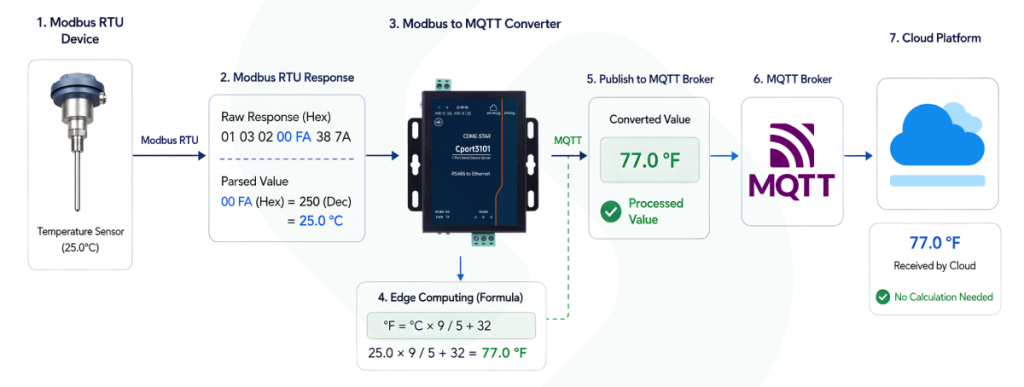
The cloud application then receives the processed value directly.
3. Publish the Data Through MQTT
After the data has been collected and processed, the converter publishes it to the configured MQTT broker.
This approach allows existing Modbus equipment to remain in place while its data becomes available to modern IoT applications.
What Should You Check When Choosing a Modbus to MQTT Converter?
Not every converter handles Modbus and MQTT in exactly the same way. Before choosing one, it is worth checking the complete communication path.
Match the Existing Modbus Network
First, identify the actual Modbus interface and communication settings.
For Modbus RTU, check:
- RS-232 or RS-485
- Baud rate
- Parity and stop bits
- Slave addresses
- Supported function codes
- Number of connected devices
For Modbus TCP, check the Ethernet interface, connection capacity, and supported communication modes.
A product that simply says “Modbus supported” may not necessarily match the existing network.
Check MQTT Functions
Look at the MQTT version, authentication methods, TLS support, QoS, automatic reconnection, and broker compatibility.
Data mapping is equally important. Modbus uses registers, while MQTT uses topics and payloads. The converter should provide enough flexibility to map the required registers into a format that the receiving application can understand.
Consider Edge Processing
If a system collects a large amount of data, local processing can reduce unnecessary traffic to the cloud.
Useful functions may include data filtering, scaling, mathematical calculations, threshold comparison, and change-of-value reporting.
For a small system with only a few devices, however, basic Modbus-to-MQTT conversion may be all that is needed.
Think About Network Failures
It is easy to focus on normal operation and forget about what happens when the connection fails.
What happens if the Internet connection drops? What happens if the MQTT broker becomes temporarily unavailable?
Look for features such as automatic reconnection, local buffering, or store-and-forward if data loss is unacceptable.
Without local buffering, data collected while the MQTT connection is unavailable may be lost.
Check the Industrial Environment
The communication protocol is only part of the solution. The hardware also needs to match the installation environment.
Depending on the application, check:
- Operating temperature
- EMC protection
- Surge and ESD protection
- Power protection
- Electrical isolation
- Mounting method
- Number of supported devices and data points
It is also worth considering future expansion. A converter that works for five devices today may not be the best choice if the system is expected to grow significantly.
Can Modbus and MQTT Work Together?
Yes—and in many industrial IoT applications, this is actually the more practical approach.
Modbus remains useful for collecting data from field devices because many PLCs, meters, sensors, and controllers already support it.
MQTT is useful for moving that data between systems, especially when remote monitoring, cloud platforms, or multiple applications are involved.
Instead of asking which protocol is “better,” it is more useful to ask:
Where does the data come from, and where does it need to go?
If the data originates from a Modbus device, Modbus may be the right choice at the field level. If that data needs to reach a cloud platform, MQTT may be a better choice for the next stage.
A Modbus to MQTT converter connects these two parts of the system without requiring existing Modbus equipment to be replaced.
Frequently Asked Questions
Is MQTT a TCP protocol?
MQTT is an application-layer messaging protocol that commonly runs over TCP/IP. It does not replace TCP; it uses TCP as its transport layer.
Can MQTT replace Modbus?
Usually, no. The two protocols serve different purposes.
Modbus is mainly used for communication between industrial devices, while MQTT is mainly used to distribute data between devices, applications, and cloud systems.
A system can use both protocols together.
Can Modbus RTU be converted to MQTT?
Yes. A Modbus to MQTT converter can read data from Modbus RTU devices through interfaces such as RS-485 or RS-232 and publish the data through MQTT.
Can Modbus TCP be converted to MQTT?
Yes. A converter can read registers from Modbus TCP devices over Ethernet and publish the required data to an MQTT broker.
Can MQTT commands be converted back to Modbus?
Some converters support bidirectional communication. In such a setup, an MQTT command can be received by the converter and translated into a Modbus write command.
This can be useful when a remote application needs to change a device parameter or send a control command.
Conclusion
Modbus and MQTT are designed for different parts of an industrial communication system.
Modbus is well suited to local communication with PLCs, sensors, meters, drives, and other field devices. MQTT is designed to move data between devices, applications, and cloud platforms.
For many industrial IoT projects, the practical solution is not to replace one with the other, but to connect them.
A Modbus to MQTT converter can collect data from existing industrial devices, map and process the data when needed, and publish it through MQTT. This provides a relatively simple path from traditional field equipment to modern IoT and cloud applications.
When selecting a converter, focus on the complete data path—from the Modbus device, through data collection and processing, to MQTT and the final application. That approach usually gives a clearer picture of what the system actually needs.
Source: Adapted from COME-STAR Industrial Networking Technical Blog → https://www.come-star.com/blog/modbus-vs-mqtt-converter/