In many industrial projects, connecting serial devices to a network for remote monitoring and data collection is becoming increasingly important. However, establishing a wired network connection is not always practical. Factory infrastructure may already be in place, monitoring equipment may need to be relocated frequently, or budget constraints may make large-scale cabling projects difficult to justify. In these situations, installing new Ethernet cabling can be expensive, time-consuming, and disruptive to normal operations.
An RS232 to WiFi converter provides a more flexible solution by replacing physical communication cables with wireless connectivity. It allows existing serial devices to connect to a wireless network without requiring firmware changes or hardware redesign. This enables remote data transmission and monitoring while reducing installation costs, simplifying deployment, and improving overall network scalability and flexibility.
Why Connect RS232 Devices to WiFi
Connecting RS232 devices to WiFi allows traditional serial equipment to operate in modern, networked environments. While RS232 works well for short, wired, point-to-point communication, many real-world applications demand more flexibility, mobility, and remote access.
Overcome Distance Limitations
RS232 is limited to short-range connections—usually no more than 15 meters. By bridging RS232 devices to WiFi, you can transmit data across buildings, floors, or even campuses without running long cables.
Enable Remote Monitoring and Control
WiFi allows RS232 devices to be accessed and controlled remotely via PCs, tablets, or cloud platforms. This is particularly useful for equipment in hard-to-reach or mobile locations.
Reduce Cabling Complexity
Wiring RS232 devices over long distances can be expensive, time-consuming, and prone to interference. Using WiFi eliminates the need for extensive cabling while maintaining reliable data communication.
Integrate Legacy Devices into Modern Networks
Many industrial systems still rely on RS232 devices. Connecting them to WiFi enables seamless integration into IP-based networks, supporting modern monitoring, data logging, and cloud-based management.
Improve Flexibility and Scalability
WiFi makes it easier to add new devices, relocate existing equipment, or expand the system without worrying about cable length or wiring constraints.
Why You Need an RS232 to WiFi Converter
RS232 devices are widely used in industrial and legacy systems, but they were never designed for wireless or IP-based networking. To bridge this gap, an RS232 to WiFi converter is essential.
A wireless RS232 converter functions as a protocol translator, converting serial RS232 data into WiFi network data and vice versa. With it, legacy RS232 devices can:
- Join existing WiFi networks
- Communicate with servers, PCs, or cloud platforms
- Be monitored and controlled remotely
- Eliminate the need for long serial cables
In short, an RS232 to WiFi converter extends traditional serial communication to wireless and IP networks, enabling legacy equipment to operate seamlessly in modern networked environments.
How RS232 to WiFi Converter Works
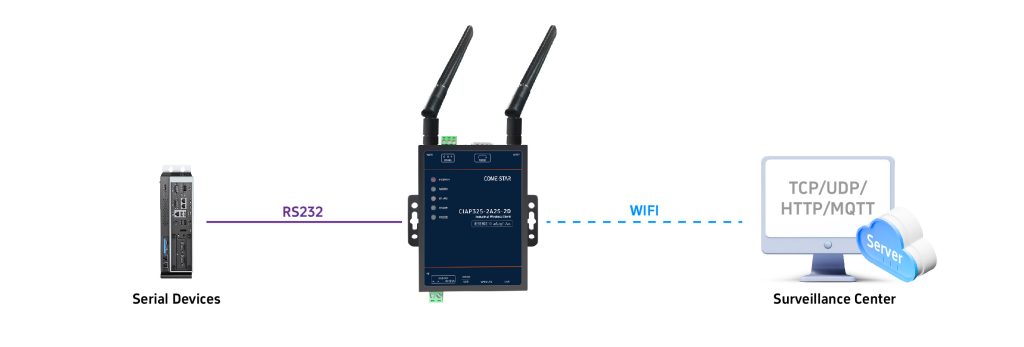
Below is the working principle of an RS232 to WiFi converter, explaining how it enables traditional serial devices to communicate over wireless and IP-based networks without modifying existing firmware or communication protocols.
Serial-to-Network Data Conversion
The converter connects to RS232 devices and reads serial data based on configurable UART parameters. Serial data is then encapsulated into IP packets and forwarded over WiFi.
Wireless and IP Network Communication
Converted data is transmitted via WiFi or wired Ethernet using TCP or UDP. Multiple working modes, such as AP, STA, and Bridge, enable flexible integration with PCs, PLCs, SCADA systems, and cloud platforms.
Transparent Data Transmission
In transparent mode, serial data is transmitted bidirectionally without alteration. The serial device operates as usual, while the converter manages all network communication in the background.
Protocol Processing and Industrial Integration
The converter can support protocols such as Modbus RTU to Modbus TCP, HTTP, and MQTT, enabling easy integration of legacy serial devices into industrial automation and IoT systems.
Connection Stability and Reliability
Features such as heartbeat packets, hardware watchdogs, and automatic reconnection help maintain stable communication and ensure reliable long-term operation in industrial environments.
How to Choose the Right RS232 to WiFi Converter
Choosing the wrong converter may cause unstable communication, data loss, or network security issues. When selecting an RS232 to WiFi converter, it is important to evaluate the actual deployment environment and communication requirements.
Network Protocol Support
If the application only requires simple serial data transmission within a local network, TCP or UDP support is usually sufficient.
However, if the device needs to connect to cloud platforms, IoT systems, or remote monitoring software, it is better to choose a converter that supports protocols such as MQTT or HTTP.
For industrial automation projects, models supporting Modbus RTU to Modbus TCP conversion are more suitable for integrating serial devices into Ethernet-based industrial networks.
WiFi Capability and Security
If the converter will operate in environments with multiple wireless devices or signal interference, selecting a model with stable IEEE 802.11 a/b/g/n support is recommended.
For higher bandwidth or more modern wireless infrastructure, some applications may also benefit from WiFi 4, WiFi 5, or WiFi 6 compatibility.
In scenarios involving industrial data or remote access, WPA or WPA2 encryption support is important to improve communication security.
Industrial Reliability
If the equipment will be deployed in factories, substations, outdoor cabinets, or other harsh environments, a wide operating temperature range such as -40℃ to +75℃ is highly recommended.
For unattended industrial sites, converters with hardware or software watchdog mechanisms can automatically recover from communication failures and improve system stability.
A rugged metal enclosure and IP30 or IP40 protection level can also help improve resistance to dust, vibration, and electromagnetic interference.
Power Supply and Installation
If the power conditions on-site are unstable or vary between projects, choosing a device with a wide DC input range such as 5~36V provides greater installation flexibility.
For industrial control cabinets, DIN-rail mounting is often preferred, while wall-mount or desktop installation may be more suitable for office or laboratory environments.
In applications with limited cabinet space, compact-sized converters are generally easier to deploy.
Come-Star RS232 to WiFi Solutions
Come-Star provides industrial-grade RS232 to WiFi converters designed for stable and reliable RS232 over WiFi communication. Our solutions support RS232 to WiFi conversion over IEEE 802.11 a/b/g/n networks, enabling seamless integration of legacy serial devices into modern wireless, IP-based, and IoT systems. With industrial reliability, multi-protocol support, and flexible installation options, Come-Star products are ideal for factory automation, field networking, and mission-critical industrial applications.
Conclusion
RS232 to WiFi converters provide a practical and reliable way to connect legacy serial devices to modern wireless and IP-based networks. By supporting transparent data transmission, flexible network modes, and industrial communication protocols, they help extend the service life of existing equipment while enabling remote monitoring, control, and cloud connectivity. Choosing Come-Star industrial-grade solution ensures stable operation, easier deployment, and long-term reliability in demanding environments.
Explore More About RS232 Networking Solutions:
RS232 to LAN Converter: How to Connect RS232 Serial Devices to a Local Network
CAN Bus vs RS232: Differences, Conversion Methods, and Practical Integration
TTL vs RS232: Differences, and Why You Need a TTL to RS232 Converter
How to Connect RS232 to Ethernet: RS232-to-Ethernet Converter
How to Convert RS232 to RS485?
How to Connect and Use RS232 to USB Converter?
How to Connect RS232 to Laptop or PC ?
RS-232 Distance Limit: How Far Can RS232 Run and How to Extend Cable Length Safely?