In fiber optic networks, a single device failure can sometimes bring the entire communication link down. In industries like transportation, energy, or industrial automation, that kind of downtime isn’t just inconvenient—it can be costly or even dangerous.
So how do you keep data flowing even if a switch fails?
That’s exactly where a fiber bypass switch comes in.
What Is a Fiber Bypass Switch
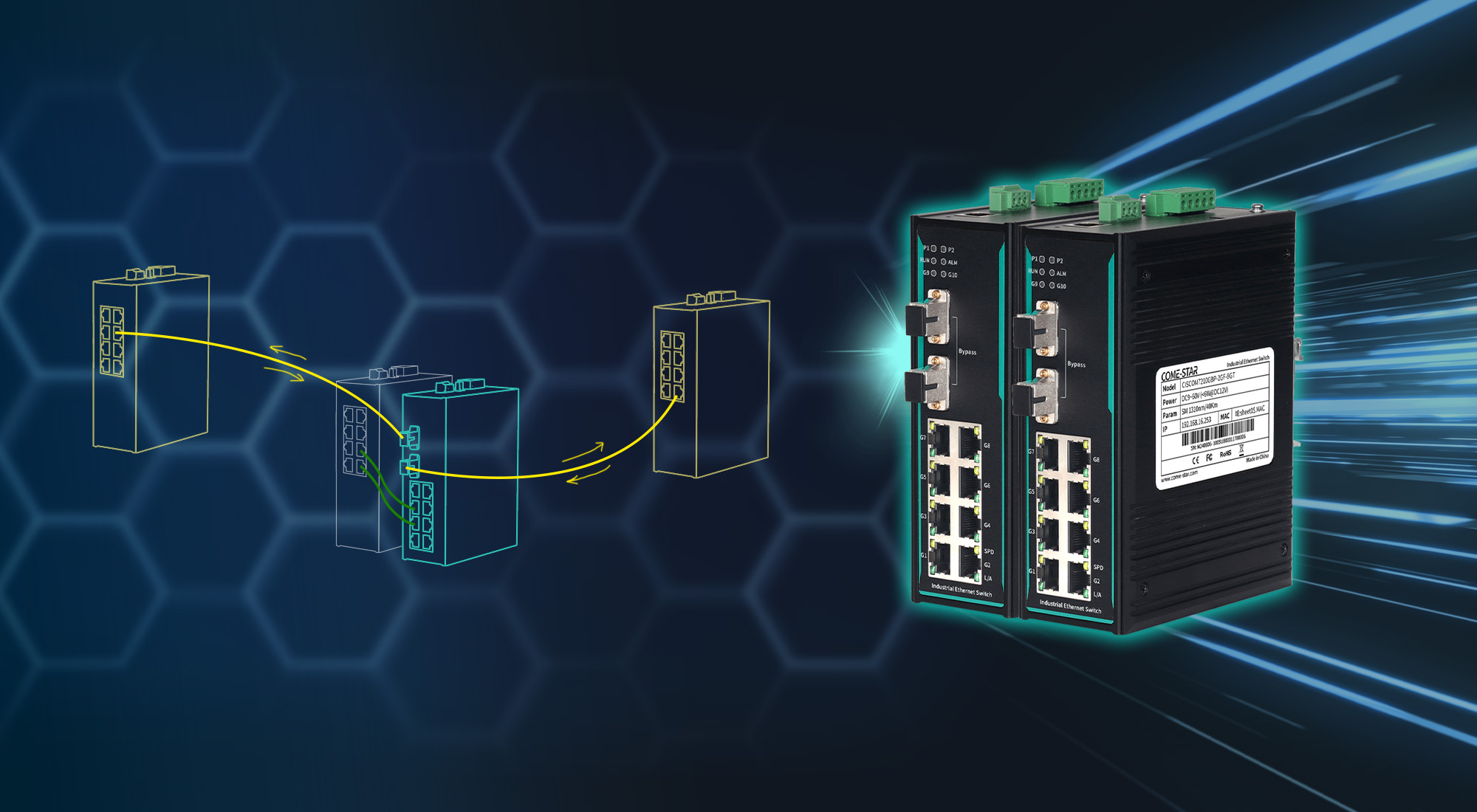
A fiber bypass switch (also called an optical bypass switch) is designed to keep network traffic running—even when the switch itself loses power or fails.
In simple terms:
👉 It automatically creates a backup optical path to “bypass” the failed device.
How Does a Fiber Bypass Switch Work
Under normal conditions, data flows through the switch like any standard fiber network.
But when something goes wrong—like a power failure—the built-in optical mechanism (often a 2×2 optical switch) instantly redirects traffic.
Instead of stopping, the signal:
- Skips the failed switch
- Continues along the fiber link
- Keeps the network alive
The key advantage here is that this process is hardware-based, meaning:
- No software configuration is required
- No delay from protocols or reconvergence
- Near-instant recovery
One thing to keep in mind:
Only specific bypass port pairs support this function, so planning port usage is important.
Where Are Fiber Bypass Switches Used
You’ll typically find them in environments where downtime is not acceptable, such as:
- Railway and transportation systems
- Power and energy networks
- Industrial automation
- Smart infrastructure
In these scenarios, maintaining continuous communication is critical for both safety and operations.
How to Choose the Right Fiber Bypass Switch
If you’re selecting a fiber bypass switch, here are the key factors to consider:
1. Port Count and Bypass Ports
Start with the basics:
- How many fiber and Ethernet ports do you need?
- How many bypass port groups are required?
Not all ports support bypass functionality, so this directly affects your network design.
2. Compatibility with Network Redundancy
Your switch should fit into your existing network, not force you to redesign it.
Check whether it supports:
- Link aggregation
- Ring redundancy (such as STP, RSTP, or ERPS)
This ensures seamless integration with your current topology.
3. Monitoring and Alarm Functions
Bypass keeps traffic flowing—but you still need to know when something fails.
Useful features include:
- Real-time port and device monitoring
- Fault alerts (SNMP, email, etc.)
- Event logs for troubleshooting
These help you react quickly and maintain long-term stability.
4. Security Features
While not always mandatory, basic security can be valuable in critical systems:
- Access control (Web, SSH, etc.)
- Traffic filtering (ACL)
- Port authentication (802.1X)
5. Performance and Industrial Reliability
In harsh environments, hardware quality matters just as much as functionality.
Look for:
- Wide temperature support
- Strong EMC protection
- Surge and lightning resistance
- Fanless, rugged design
In practice, many industrial networking vendors offer rugged bypass switches built specifically for these demanding conditions, helping ensure stable operation over the long term.
Why Fiber Bypass Switches Are Essential
A fiber bypass switch isn’t just a “nice-to-have” feature—it’s often a critical safeguard.
It helps you:
- Prevent total network failure
- Maintain continuous data transmission
- Reduce downtime and operational risk
- Improve overall system reliability
For mission-critical networks, that can make a significant difference.
Conclusion
If your network can’t afford downtime, a fiber bypass switch is one of the simplest and most effective ways to improve resilience.
By automatically rerouting traffic during failures—without relying on software—it ensures your communication stays uninterrupted when it matters most.
When choosing one, focus on compatibility, reliability, and real-world deployment conditions to get the best long-term performance.
Source:
Original article adapted from Come-Star
https://www.come-star.com/blog/what-is-a-fiber-bypass-switch-and-how-to-choose-the-right-one/